Talk or type about training, sleep, and recovery. With permission, AI Coach can use recent workout and health summaries to answer questions, create a training-plan draft, and refine it with you.
Talk training: decide what to do today and how hard to go
Talk sleep and recovery: understand trends, then train, ease off, or rest
Build a plan: create a savable draft and keep refining it
AI Coach and training plans are Pro features. You choose what to share and which suggestions to use.
AI CoachFeature example
I have twenty minutes on three days this week. How could I plan my workouts?
We could space the sessions out and alternate strength, light activity, and recovery. Share your goals and recent training, and we can adjust the plan together.
Shape your plan together
Describe your goals and available time
Use workout and health summaries you allow
Review, edit, and save a plan draft
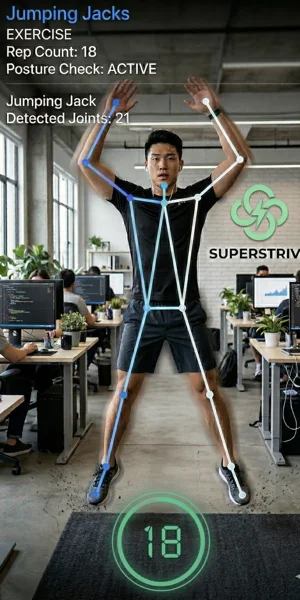
02 Camera motion detection
Focus on the movement. Let your phone count.
Choose squats or jumping jacks, position your phone, and keep your full body in the front camera's view. On-device detection counts reps and provides cues for supported movements.
Choose a movement and follow the positioning guide
Move while the app counts reps and shows cues
Review the session when you finish
Camera mode is optional and currently supports only squats and jumping jacks. Raw camera frames are not saved by default.
Motion detection illustration, not a screenshot of the current app
03 Training analytics
See how you train, beyond a list of workouts.
Compare training volume by week and activity type. Put individual sessions into a longer view, and try switching the chart metric to explore what each measure shows.
Compare workout count, duration, distance, elevation, energy, and training load
Explore intensity distribution and heart-rate zones when data is available
Revisit individual sessions in your log and go deeper with Pro Growth reviews
Some metrics require Health access and matching records. Available data varies by activity and recording device.
Training analyticsFeature example
Four-week total · Workouts13 sessions
Week 1
3sessions
Week 2
4sessions
Week 3
2sessions
Week 4
4sessions
Four-week total · Duration295 min
Week 1
70min
Week 2
95min
Week 3
45min
Week 4
85min
Four-week total · Distance36.5 km
Week 1
8.4km
Week 2
12.2km
Week 3
5.1km
Week 4
10.8km
Four-week total · Elevation400 m
Week 1
90m
Week 2
150m
Week 3
40m
Week 4
120m
Four-week total · Active energy2,250 kcal
Week 1
540kcal
Week 2
720kcal
Week 3
360kcal
Week 4
630kcal
Four-week total · Training load186
Week 1
42
Week 2
61
Week 3
28
Week 4
55
Interactive example · Fictional data illustrating the charts, not actual workout results
What the app does now
Choose an activity that fits how you feel, record indoor and outdoor workouts, and follow your progress through goals and trends.
Today's activity
Train today, or take time to recover?
Use the sleep, recovery, and recent training data you choose to share to find a useful next step: train, ease off, or recover.
Balances training, lighter activity, and recovery
Uses available sleep, readiness, and training-load signals
Keeps the recommendation useful when AI services are unavailable
Focus boundary
Pause the doomscroll, then use with intention
SuperStrive restricts selected distracting apps. Complete real movement to open a bounded window for normal use; when it ends, the restriction returns.
Pause selected apps before the automatic scroll
Use real movement to break the loop
Return to bounded use—not more total screen time
Focus on moving. Review the details afterward.
A clearer record of every run, ride, and hike.
Record routes and laps, and follow your rhythm with voice cues. Look back at your activity when the workout is done.
Track real routes on the map
Voice prompts reduce screen-gazing
Auto lap captures rhythm changes
Review your workout summary
Apple ecosystem
Watch, widgets, and Live Activities
Companion surfaces keep active workouts and glanceable progress close without requiring the iPhone app to stay open.
Apple Watch workout companion
Home Screen and Lock Screen widgets
Live Activities for supported active workouts
Features
Built with clear boundaries
Health, camera, location, and Screen Time features only work when you grant the related permissions. SuperStrive is wellness support, not medical advice.
Free everyday essentials
Get daily guidance, record workouts, manage goals and basic metrics, and unlock limited app time after movement for free.
Go further with Pro
Pro unlocks AI Coach, AI training plans, growth reviews, and longer historical views. Subscription status is handled through the App Store.
Seven app languages
The app interface currently supports English, Simplified and Traditional Chinese, Japanese, Korean, French, and German. Website language availability may differ.
Start with the next useful action.
Get daily guidance, record workouts, manage goals and basic metrics, and unlock limited app time after movement for free.